












































































































































































































































































































































































































































































Icacls & File Permissions -Enumerating Windows
17.3 - Leveraging Windows Services
17.2.1 - File Permissions - icacls
This displays ACLs, where each ACL is made up of various ACEs
- ACL -> Access Control List
- ACE -> Access Control Entry
Each ACL has the structure <SID>:<PERM> (SIDs may be numerical or name-friendly)
An ACE is an individual permission rule which controls the individual permissions of a security principal on a file object, these are the following high-level permissions of an ACL
- Fully Access(F)
- Modify Access (M)
- Read & Execute Access (RX)
- Read-Only Access (R)
- Write-Only Access (W)
There are more advanced permissions that deal with inheritance rights that only apply to directories.
- Object Inherit (OI)
- Container Inherit (CI)
- Inherit Only (IO)
- Do Not Propagate Inherit (NP)
- Permission inherited from parent container (I)
This is useful for service hijacking, you need modification permission over the service binary, similar to cron exploitation.
https://github.com/nickvourd/Windows-Local-Privilege-Escalation-Cookbook/blob/master/Notes/WeakServiceBinaryPermissions.md
https://github.com/nickvourd/Windows-Local-Privilege-Escalation-Cookbook/blob/master/Lab-Setup-Scripts/WeakServiceBinaryPermissions.ps1
icacls file.exe
icacls folder
In PowerShell, use Get-ACL and Set-ACL
Get-ACL file.exe
Example - Permission Mis-configuration 1
An example of icacls showing that our current low-privileged user (Alfred) has full access to the Administrators desktop
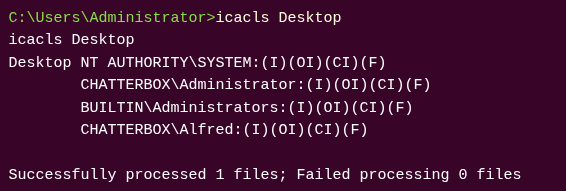
Icacls can then be used again to change permissions
icacls root.txt /grant alfred:F